
DJ Nimi's Kontrol S8 guide: Stems, pads and waveform changes
Understand the supported Traktor baseline, existing-Stem loading, pad and encoder controls, waveform changes, user-reported testing and guarded restoration.
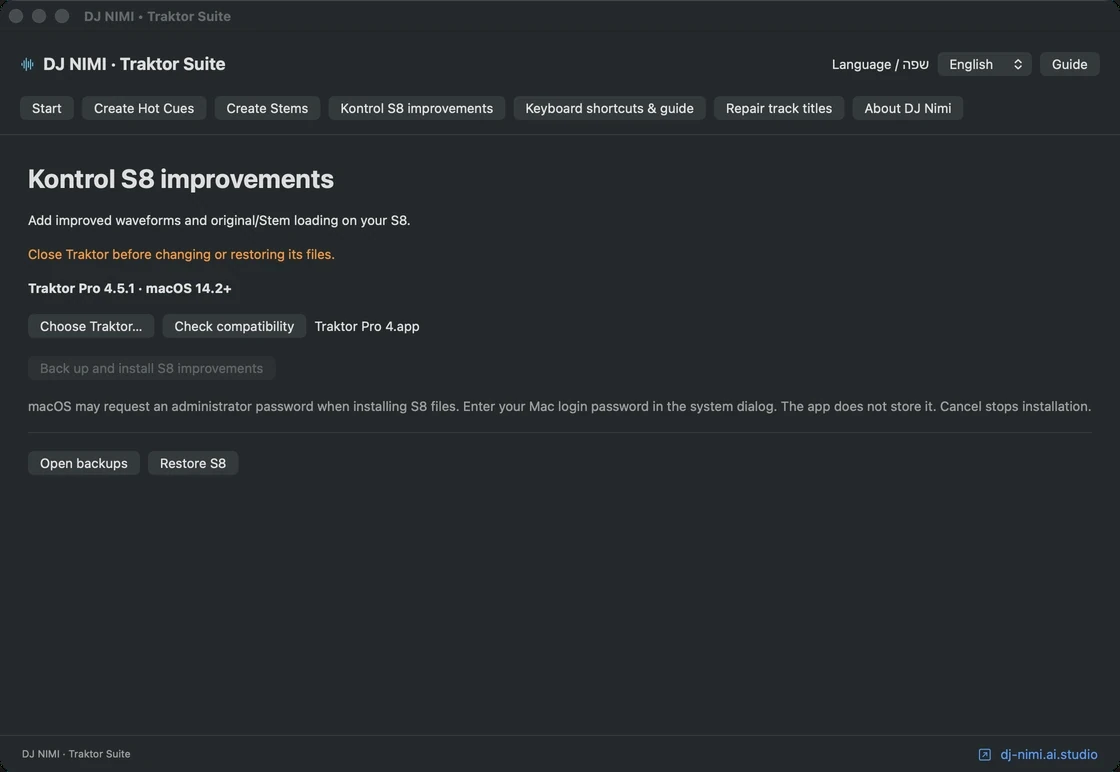
What does DJ Nimi's optional Kontrol S8 package change?
The S8 section of DJ NIMI Traktor Suite provides an optional set of Traktor resource changes for a specific supported installation. Its goals are practical: clearer waveform display, convenient access to existing Stem versions and a pad-based approach to controlling Stem parts. It is independent experimental software, not an official Native Instruments update. The installer checks the actual files before applying changes rather than assuming that a familiar version number is enough. Read the compatibility result and keep a backup before deciding to install this part of the Suite.
The supported resource baseline is Traktor Pro 4.5.1 build 21, with exact original or recognized installed file hashes required. A future version, an older modified installation or another customization can therefore be rejected even if Traktor opens normally. That rejection protects against editing files whose contents the patch does not understand. Do not disable the check or manually force the change into a different version. The purpose is a controlled preparation step on a known setup, not a promise that the same resource edits work on every Traktor installation or every controller.
How does loading a Stem version differ from generating one?
With the supported S8 changes and the relevant loading preference, ordinary loading prefers a Stem version that already exists. Shift with the load action selects the alternative original recording. This gives you a practical way to choose between prepared parts and the full source without treating the two as unrelated songs. The feature does not create missing Stems from the controller. Prepare the files separately in Traktor before relying on them in a set, and test loading with a track whose original and generated versions you can identify confidently.
The browser's folder navigation remains a different action from loading a track. Rehearse with a small playlist and confirm the selected row, focused deck and loaded version. Do not assume that pressing Load on a track without generated files will start separation or make those files appear. Keep the original available as a fallback and check external drives before performing. A convenient load gesture is useful only when the referenced audio is actually reachable and you know which version has been placed on the deck.
How do the S8 Stem pads work in this modification?
For a loaded Stem deck, the modified Freeze action selects the dedicated Stem pad mode. In that mode, pads one through four address the mute controls of the corresponding four Stem parts. Pads five through eight select the matching Stem part while held, allowing the loop encoder to adjust that part's level. Holding Shift with that control changes the filter instead. This is a specific mode-dependent behavior: the same hardware can have other roles in other deck types or pad modes, so confirm the active mode before using it.
Practice one part at a time. Start with a prepared track, identify the four parts by listening, toggle one mute and return it to the intended state. Then test holding the corresponding lower-row pad while moving the encoder gently. Check the level response, release the pad and verify that ordinary encoder behavior returns. Repeat the filter gesture separately. Do not infer a control's state only from a hand position or from a memory of another controller. Listen to the result and inspect the actual S8 and Traktor displays together during rehearsal.
Why should you relearn the controls instead of assuming the stock behavior?
The resource changes restrict the new behavior to the S8 controls rather than enabling it automatically in the shared D2 module. They also change how Stem controls are reached when this mode is active. In particular, the modified S8 path disables the original Stem-volume fader connections in the affected shared code. If you depend on the previous fader workflow, that is a meaningful difference to evaluate before adoption. A new pad-and-encoder layout can be convenient, but it is not identical to every familiar S8 interaction.
Write down the controls you actually need during a transition and rehearse them with the modified setup. Include returning from the special mode, switching deck focus and loading another track. Keep a simple full-track transition as a fallback while learning. Installing a modification shortly before an event creates unnecessary uncertainty even when the package passes its file checks. Compatibility validation tells you the patch recognizes the files; it does not tell you that your hands have learned the new control behavior or that every musical transition will benefit from it.
What changes in the waveform display?
The package adjusts the S8 waveform resources so full-track and Stem waveform views use their intended display area and refresh behavior. A loaded generated Stem stream can become available after the track identity changes, so the modified resources schedule refreshes around loading. The aim is a usable display when moving between prepared material, not a new audio-analysis engine. Waveforms remain visual aids. Confirm the sound and the cue positions rather than assuming that a colorful, refreshed waveform guarantees a correct beatgrid or a musically appropriate marker.
The current installer and system requirements are listed on the central download page. This guide describes the preparation workflow; button names and compatibility details can differ between releases. Before replacing an existing installation, close Traktor and keep independent backups of your collection, settings and installed modifications. Read the instructions included with the installer you actually downloaded. If you previously modified S8 resources, compatibility checks may detect differences in those files. Do not copy display resources between versions or bypass a failed check. Use the recovery procedure that matches your backup. Start with a few tracks outside a performance, check the results, and only then expand the change to your library. Installation alone does not prove compatibility with every computer or controller configuration. Keep the previous installer and its backup until you have finished evaluating the update.
What should you prepare before installation?
Close Traktor before applying or restoring resource changes. Keep independent copies of important settings and collection data, and confirm which application installation the Suite has selected. Read the preflight result, including any mismatch or unsupported-file message. The application may request a normal macOS administrator action when modifying protected application resources. Use the system's own authorization interface; never send a password in a support message or paste it into a website article. The installer should work within the expected application paths and checks, not through broad manual permission changes.
If you already installed an older patch, use the matching package and backup to restore that state before attempting a different package when required. Do not combine pieces from separate releases or overwrite an unknown modified file. Earlier packages can differ in their resources and colour scheme. Preserving the original package and its backup makes it easier to understand the transition. A version label alone is not enough when the actual resource contents differ; that is why exact file checks are part of the installation process.
What does the available S8 testing establish?
DJ Nimi reported testing on a Kontrol S8 without problems so far and approved distribution. That is useful real-user feedback, but the report did not identify the exact package build and colour scheme. It should not be treated as a certification of every change in the separate website package. The release preparation also ran automated tests using sample files for installer backup and restore behavior and other safeguards. Those checks validate specific software conditions; they do not replace a long physical-controller session or testing on every supported Mac configuration.
Use the report as a starting point for your own controlled test. Check loading an existing Stem, loading the original, each pad action you intend to use, the encoder gestures and waveform behavior after several track changes. Test returning to a normal workflow and confirm that your audio configuration remains as expected. Record the software version, package version and controller used. A precise result is more useful than a general statement that everything works, especially if a later update changes one part of the environment.
How does restoration protect later changes?
The installer keeps backup information and checks the expected installed state before restoring. If a file has changed after installation, an automatic restore can stop rather than replacing that newer state blindly. This may happen after a Traktor update or another resource modification. Preserve the current files and the matching backup while investigating. Do not interpret a mismatch as permission to bypass the guard. It means the tool needs a known state before it can safely apply the specific reversal it prepared earlier.
Keep Traktor closed during restoration, then reopen it and test the standard controls and display. A recovery plan should be rehearsed before an important performance, not invented while trying to fix an unexpected behavior in front of an audience. Avoid deleting the original installer or backup simply because the first session was successful. The ability to return to a known configuration is part of making an experimental tool practical. It also helps separate a controller issue, a resource mismatch and an audio-file problem when troubleshooting later.
Is this a general upgrade for every Traktor controller?
No. The documented resource changes target the supported S8 workflow. They are not a promise of equivalent support for the D2, S4, other hardware or future Traktor versions. The keyboard profile and computer font tools are separate features with their own scope and checks. A successful test of one section does not validate all the others. Install only the features relevant to your workflow and test them independently before combining them. That makes both learning and diagnosis more manageable than changing every part of the setup in one session.
DJ Nimi's goal is to reduce preparation friction while keeping the music and performer in control. The free installer below remains independent experimental software used at your own risk, with acknowledgement before the download link appears. Read the installation guide, prepare a small test playlist and retain your recovery files. Use the modifications that make your actual set clearer and easier to perform, and keep ordinary full-track playback available. A useful S8 improvement is one you understand and can recover from, not merely one with more colors or a longer feature list.
Sources and listening
Questions and answers
Which Traktor version is the S8 patch designed for?
The resource baseline is Traktor Pro 4.5.1 build 21. Exact recognized file hashes are also required; the version label alone is not sufficient.
Does normal S8 loading generate missing Stems?
No. It prefers an existing Stem version in the supported workflow. Shift with the load action selects the original. Prepare missing Stems separately.
How are Stem parts controlled in the modified pad mode?
Pads 1–4 toggle the corresponding mutes. Hold pads 5–8 to select a part while using the encoder for level; Shift changes the encoder gesture to filter. Verify the active mode first.
Does the modification keep the previous Stem-fader workflow unchanged?
No. The modified S8 path disables the affected stock Stem-volume fader wiring. Rehearse the pad-and-encoder workflow before relying on it.
Does DJ Nimi's S8 test certify every release and setup?
No. DJ Nimi reported no problems so far on an S8, but the exact tested package and colour scheme were not specified. Test your own build and configuration.
Should I bypass a resource mismatch to install or restore?
No. Preserve the current state and matching backup, investigate the mismatch and use the supported recovery path rather than forcing unknown files.



Comments, questions & ideas
Help shape Traktor Suite: what worked, what is missing, and what should improve? For bugs, include the app version, macOS, controller and steps to reproduce.