
How to use Stems for clearer DJ transitions in Traktor
Practical vocal handovers, bass exchanges and rhythm bridges: understand separation artifacts, EQ, preparation, storage and fallback loading before a performance.
What are Stems, and how do they change a DJ transition?
Stems let a DJ control separate musical parts instead of treating a recording as one inseparable stereo mix. With Traktor's generated Stems, the four parts are drums and percussion, bass, other instruments and vocals. You can reduce one part while leaving the others playing, creating room for a second track without removing everything in the same frequency range. This changes the available choices during a transition, but it does not decide which choice sounds good. A clear arrangement, controlled levels and careful listening still matter more than the number of available controls.
Imagine that you want the rhythm of one track to continue while the singer from another track enters. With two full recordings, both singers may compete. With Stems, you can reduce the first vocal part while retaining its drums. Or you can remove a bass part that clashes with the incoming track while preserving other instruments. These are specific musical decisions, not a requirement to manipulate every part throughout the set. DJ Nimi's practical approach is to identify a reason for each separation before adding more actions to an already busy performance.
Are generated Stems the same as original studio multitracks?
No. A generated Stem is an estimate extracted from a finished recording. The separation system tries to identify overlapping sources that have already been mixed together. Reverb, distortion, layered instruments and dense percussion can make those boundaries uncertain. An original studio multitrack contains recordings or groups supplied from the production session, so it has a different origin. Even commercially supplied four-part Stem releases may group instruments differently from automatically generated drums, bass, other instruments and vocals. Check the labels and listen instead of assuming every file has identical contents.
This distinction explains why a vocal can retain traces of a snare or why a cymbal can sound different when isolated. Those artifacts do not necessarily make the whole track unusable. A part may work during a short transition inside another mix while sounding exposed on its own. The opposite can also happen: a quiet artifact becomes obvious when the surrounding arrangement drops away. Evaluate the exact section you intend to use, at the intended level, alongside the other track. A file that successfully loads is only the beginning of that assessment.
Why does EQ not solve every problem that Stems solve?
EQ changes frequency regions. Lowering the bass control reduces low-frequency content across the signal, which can include bass instruments, the weight of a kick and some vocal energy. Stem control targets an estimated musical group instead. Removing the bass Stem aims to remove that part while leaving drums and other groups available. These tools overlap in practical use, but they are not interchangeable. A clean bass handover may need a Stem adjustment, an EQ adjustment or a combination, depending on what remains in the other parts.
Do not judge the transition only by watching meters. Listen for a weak kick after a broad low-frequency cut, unwanted low notes in another instrument group, or a sudden jump when the incoming bass enters. Use gain controls deliberately and keep headroom. Combining two parts can still create a louder result even when each track sounds comfortable alone. Avoid treating the limiter as a creative decision maker. If a transition sounds crowded, removing an unnecessary part is often more effective than raising a level to make another part fight through it.
How can you mix vocals without making two songs compete?
Choose one main vocal focus at a time. Identify where the first phrase ends, where the second begins and whether either recording contains backing vocals in another part. Start by keeping the outgoing rhythm and introducing the incoming instrumental arrangement. Bring the new vocal in at a point that makes musical sense, then listen for the outgoing singer's reverb or remaining fragments. Short overlaps can be intentional, but an accidental collision of two unrelated lyrics usually distracts from the transition. Stems give you more control; they do not remove the need to hear the phrasing.
For a first rehearsal, work with two tracks and one planned vocal handover. Mark a preparation cue before the event and an exit point that leaves room to recover. Listen to the transition several times without looking at the controls, then repeat it with the actual controller movements. Keep a version that uses the original recordings as a fallback. This exercise reveals whether the musical idea works before you attempt additional effects, loops or multiple isolated parts. A memorable transition can be simple when its timing and vocal focus are clear.
How do you avoid two bass lines competing?
Find the point where the incoming track should take responsibility for the low end. Before that point, reduce its bass part or otherwise manage its low frequencies. At the handover, reduce the outgoing bass and introduce the new one with controlled levels. Check the kick as well: generated drums may still carry substantial low-frequency energy. Removing a bass Stem does not guarantee the entire low-frequency range becomes empty. Listen on a system that lets you judge the relationship between kick, bass and the remaining instruments, while protecting your hearing.
Key compatibility can help, but a displayed key is not a guarantee. Bass movement, chord changes and melodic fragments can conflict even when two library labels suggest a match. Test the specific section and pitch setting used in the transition. If the blend sounds unstable, choose another entry point, shorten the overlap or remove an additional musical part. You do not need to force every pair of tracks into a long blend. The listener hears the musical result, not whether you used every feature available in the software.
What can you do with drums and instrumental parts?
A drum part can extend rhythmic continuity while the next track's atmosphere arrives. A short loop may help bridge an arrangement change, but check that its end joins naturally and that the groove does not drift against the incoming track. Beatgrid alignment supports timing; it does not guarantee that every swing pattern or live performance will fit. If the loop contains a fill, decide whether repeating that fill is intentional. Repetition that sounds exciting once can become distracting when a listener hears the same flourish several times.
The other-instruments part can contain chords, melodies, effects and material the separation system did not assign elsewhere. Treat it as a broad musical group, not a promise that only one instrument is present. It can help build atmosphere under a vocal or support a transition after the drums change, but it can also introduce harmonic clashes. Listen to it alone during preparation and then within the intended blend. Give each active part a role. When several parts serve the same role, muting one may improve clarity more than adding an effect.
How should you prepare and store generated files?
Traktor links the original track and its generated Stem version within the collection workflow. The generated audio is stored separately, using the Stem container format. Keeping the original source available remains important, and the location of generated files matters when you move between drives or computers. Do not assume that copying only a playlist also copies all the audio it references. Before taking a setup to a performance, verify that both the originals and the generated versions you need are reachable from that setup without a missing external drive.
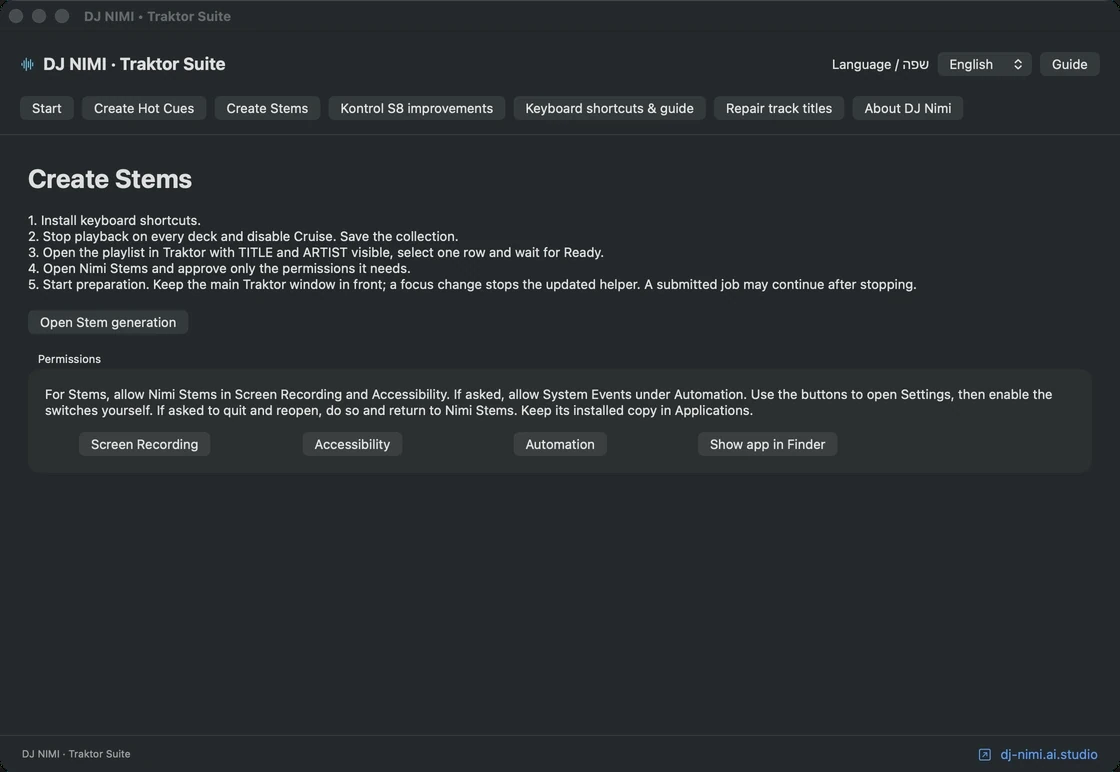
Prepare a focused selection first, listen to the results and retain a backup strategy for the collection and audio. DJ NIMI Traktor Suite can help request native Stem generation across a visible playlist, but it does not provide a new separation engine or cloud storage. Its batch workflow requires Traktor open with playback, Cruise and recording stopped. Setup changes use a different closed-application stage. Read the batch-preparation guide for the exact sequence. Do not use a successful preparation run as a substitute for checking file availability on the computer you will actually perform with.
Can a controller load the original when a Stem version exists?
The choice depends on your Traktor configuration and controller workflow. The Suite's optional Kontrol S8 resource changes are designed so normal loading prefers an already existing Stem version, while Shift with Load selects the original. This feature does not generate missing Stems from the controller. It also depends on the supported Traktor resources passing the installer's compatibility checks. Do not assume that a different controller, a future Traktor update or an unrelated mapping behaves the same way. Test the exact setup before using it in front of an audience.
Make fallback loading part of your rehearsal. Practice identifying which version is loaded, returning to the original and completing a simple transition if an isolated part sounds wrong. A fallback should be familiar enough that you can use it without diagnosing the entire preparation history during a set. Keep important controls easy to reach and avoid adding several new mappings immediately before a performance. More options are useful only when you understand their current state and can recover from an unexpected result calmly.
What is a useful practice routine for modern Stem mixing?
Choose two tracks and write down one objective: a vocal handover, a bass exchange or a rhythm bridge. Prepare the necessary files and listen to the relevant parts. Confirm cue positions and the beatgrid, then rehearse the transition using only the controls required for that objective. Record a practice take if your setup and music rights allow it, and listen back without concentrating on the controller. Notice changes in energy, clarity and timing. Keep the version that serves the music, even if it uses fewer isolated parts than your first experiment.
Next, repeat the exercise with a different arrangement rather than adding complexity immediately. A sparse vocal track and a dense instrumental recording will expose different limitations. Build a small collection of transitions you understand, then combine them into a set with room for normal full-track playback. Modern DJing benefits from new tools when they expand musical choice without overwhelming attention. DJ Nimi's experimental Suite supports preparation within that process. The installer below is free, independent software used at your own risk, with an acknowledgement before download; it does not grant rights to redistribute the music or its separated parts.
Sources and listening
Questions and answers
What are the four parts in Traktor-generated Stems?
Traktor separates generated Stems into drums and percussion, bass, other instruments and vocals. Listen to each part because separation artifacts and spill can remain.
Are generated Stems identical to studio multitracks?
No. Generated parts are estimates extracted from a finished mix. Studio multitracks come from the production session, and supplied Stem releases may group their parts differently.
Can Stems replace EQ completely?
No. Stem controls target musical groups while EQ changes frequency ranges. A transition may benefit from either tool or both, with careful level management.
Does removing the bass Stem remove every low frequency?
No. Drums and other instruments can retain low-frequency energy. Listen to the kick and the remaining parts when handing the bass between tracks.
Does the Suite's S8 Load feature generate missing Stems?
No. On a supported, correctly installed setup, normal loading prefers an existing Stem version and Shift with Load selects the original. Missing Stems must be prepared separately.
Does DJ Nimi's Suite improve the separation algorithm?
No. Its helper coordinates requests to Traktor's native separation. Sound quality still depends on that processing and the source recording; listen before performing.



Comments, questions & ideas
Help shape Traktor Suite: what worked, what is missing, and what should improve? For bugs, include the app version, macOS, controller and steps to reproduce.