
How to test Arabic, Persian and Urdu titles in Traktor
Use isolated A/B/C display samples to distinguish missing glyphs, letter joining and direction before repairing selected collection titles.
Why can Arabic, Persian or Urdu titles appear disconnected in Traktor?
Arabic-script text depends on more than a font containing the right letters. Many letters change shape according to their neighbors, while the text direction and the placement of digits or Latin words require their own handling. A title can therefore have recognizable letters but incorrect joining, correct joining but the wrong order, or missing characters because the font lacks coverage. Diagnose these symptoms separately. Persian and Urdu use additional letters and conventions, so a successful Arabic sample does not prove that every name in the other languages will behave correctly.
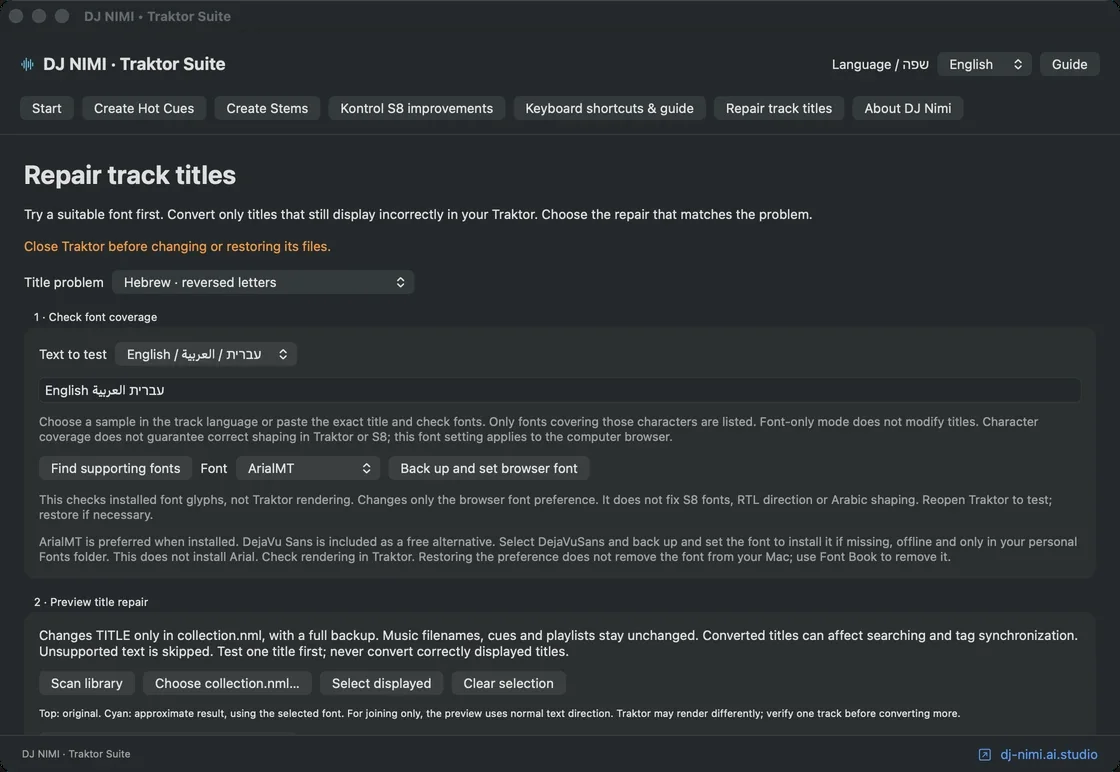
DJ NIMI Traktor Suite includes a local display test and two Arabic-script repair modes to help distinguish these cases. The test creates isolated silent files instead of changing your music titles. The repair modes address joining alone or joining together with visual direction. They are targeted metadata workarounds for a display that needs them, not a universal replacement for ordinary Unicode text. Keep names that already display correctly unchanged. The purpose is to make a multilingual collection usable without losing track of the original names or applying an unnecessary conversion to everything.
What does the three-version display test tell you?
The test provides eight sample strings in three variants, producing twenty-four silent audio files. Variant A contains the original title. Variant B applies joining without changing the visual direction. Variant C applies joining and direction handling together. The artist field identifies the sample number and variant so you can compare the same text across rows. A separate READ-ME.html file shows the reference text. This structure helps you choose based on what your Traktor setup actually displays instead of guessing from a screenshot made on someone else's computer.
The samples include Arabic text, mixed Latin text and digits, Persian characters, Urdu-related text, a non-joining separator and vowel marks. They are examples rather than an exhaustive test suite for every possible name. Compare the samples relevant to your library carefully. If variant A already looks correct, that is a reason not to convert those titles. If B is correct and C is not, a joining-only approach may fit that display. If C is the readable version, test the corresponding mode on a very small selection before expanding the change.
How do you create and import the test safely?
Choose the display-test action in the title-repair section and select a folder for its output. The Suite creates a separate test directory containing the silent WAV files, DJ-NIMI-Arabic-Test.nml and the reference page. Creating these files does not modify or automatically import your existing collection. Keep the output together so its references remain meaningful. The files are deliberately silent, so the absence of music is expected; the exercise tests title rendering, not playback quality or the separation of instruments.
Import the generated NML as a playlist in Traktor and compare its entries against the reference page. If Traktor asks which metadata to use, choose the collection information for this test so the intended variant titles are retained. The artist column helps distinguish A, B and C. Do not rename the samples during comparison. Look at the full title, including digits and brackets, and check the display you plan to rely on. A computer browser result does not establish that a controller screen uses the same font or text renderer.
How do joining and direction differ?
Joining concerns the letter forms that connect within a word. Direction concerns the order and placement of text runs, particularly when a title mixes scripts. A string can need one adjustment without needing the other. Applying both simply because more processing sounds more complete can make an already correct direction wrong. Use the test results to decide what the observed display needs. The correct choice is the smallest adjustment that improves the intended title while preserving its meaning, not the mode that changes the greatest number of characters.
Mixed names deserve extra attention. A Latin artist name, a version number and a parenthesized phrase may each have internal order that should remain readable. Persian non-joining conventions can be meaningful within a word, and vowel marks need to stay associated with the right letters. Do not judge success only by whether the title looks more connected. Read it, compare it with the reference and ask someone who reads that language if you cannot verify the spelling yourself. An attractive shape is not sufficient evidence of a correct name.
What does the Suite change when you repair real titles?
The title-repair workflow changes selected TITLE values in Traktor's collection file. It does not rename the audio files or alter their sound. Existing cue data and playlists are not the target of the operation. The collection still contains important work, so make an independent backup and close Traktor before writing changes. Confirm that you selected the collection belonging to the installation you actually use. Old version folders and backups can look similar, and a repair made in the wrong file will not necessarily appear in your current browser.
Review the proposed before-and-after titles for a small group. The application includes checks for unsupported, unverifiable or already converted strings and may skip them rather than guessing. Do not remove those checks to make a progress count larger. Common Persian letters and digits are covered by the implemented adapter, but that is not a guarantee for every historical character, typographic convention or mixed string. Test the exact titles you need. When a name is rejected, preserve it for manual review rather than repeatedly applying different conversions until it looks plausible.
Can a different font solve the problem without changing metadata?
A font can resolve missing character shapes if it contains the required glyphs and the application uses it correctly. It does not automatically supply all the shaping and bidirectional behavior of a full text renderer. Start with font coverage when you see squares or missing letters, then use the three-version test to investigate joining and order. The Suite's font setting concerns the computer browser. It is not a replacement for the fonts inside every controller, and it does not promise that all languages will render correctly on every device.
Changing a font may also affect density and readability in the library. Check several title lengths, narrow columns and punctuation at the size you use while preparing music. Choose a readable result rather than a decorative appearance that makes similar letters hard to distinguish. If you install the optional bundled font, keep its license information with the software and understand that font installation is separate from title conversion. A successful font preview alone is not a reason to change the stored titles of an entire collection.
How do you verify a real repair after reopening Traktor?
Find the exact tracks you changed and read their complete titles. Test normal search terms, check that the selected result is the intended recording and load it on the setup you use. Compare a few unchanged tracks as well. If you use a controller display, inspect it separately from the computer. A visual-order workaround can behave differently in another application that already understands standard text direction. Record which display and software version you tested so you can repeat the same checks after an update instead of relying on memory.
Also confirm that ordinary library work remains comfortable. A title that looks right but becomes difficult to search may require a different workflow or a decision to preserve standard metadata elsewhere. Collection titles, embedded tags and filenames are separate sources. Importing or refreshing metadata from another source may bring back the original title. Avoid a cycle of automatic conversion and automatic replacement. Decide which source you maintain as the original, test one reimport and keep notes about the display-specific adjustment you chose for Traktor.
Why might restoring a backup stop after further library edits?
The Suite records the original and installed collection states and checks them before automatic restoration. If you add tracks, edit cues or change playlists afterward, the current collection may no longer match the repaired state. Restore then stops to avoid overwriting later work with an older file. This is a deliberate protection, not evidence that your music is damaged. Keep both the current collection and the available backup while you determine what changed. A full-file replacement is not always the right recovery method when newer work needs to survive.
Do not bypass a mismatch or repeatedly force the repair. Review the error, preserve the files and decide whether a targeted manual title correction is more appropriate. Keep Traktor closed during file-based restoration, then reopen it to verify the result. The display test remains useful because it can be repeated without converting the real library. If an update changes rendering behavior, test again before applying the old workaround. A mode that was helpful on one version may be unnecessary on another, and unchanged standard text is preferable when the display already handles it correctly.
What should a multilingual DJ remember before downloading?
Treat Arabic, Persian and Urdu as languages with their own reading requirements, even when they share a script family. Test representative titles and compare them with a trusted original. Keep backups, use a small selection and verify searching as well as appearance. Avoid promises that a single font or a single conversion can fix every controller and every name. The practical goal is a collection you can read confidently while choosing music, with a clear understanding of where the workaround is stored and how it interacts with your other tools.
DJ Nimi provides the Suite as independent experimental software. The download section below explains that use is at your own risk and requires acknowledgement before revealing the installer link. Read the installation guide first and start with the isolated display test. It gives you evidence about your own setup before real metadata changes. Once you have a readable result and a verified recovery plan, expand gradually. Good language support is measured by correct names and reliable everyday use, not by the number of entries an automated operation can change in one run.
Sources and listening
Questions and answers
What are the A, B and C display-test variants?
A is the original text. B applies letter joining only. C applies joining and direction handling. Compare the actual Traktor display with the reference page.
Does creating the test change my music collection?
No. It creates a separate folder with twenty-four silent WAV files, a test NML and a reference page. Importing the test playlist is a separate step.
What if the original A variant already looks correct?
Leave those titles unchanged. A display workaround is unnecessary when the original text renders correctly.
Does joining-only repair also reverse the text?
No. Joining-only and joining-plus-direction are separate modes. Choose based on the test result, not the assumption that more conversion is better.
Will a Mac browser font change fix every controller screen?
No. The computer font setting is not a controller font patch. Verify the computer and controller displays separately.
Are all Persian and Urdu titles guaranteed to convert?
No. The adapter handles supported cases and skips unsupported or unverifiable strings. Test representative real titles and preserve originals for manual review.

Comments, questions & ideas
Help shape Traktor Suite: what worked, what is missing, and what should improve? For bugs, include the app version, macOS, controller and steps to reproduce.